- AI Automation
- Lead Generation
- n8n
- HubSpot
- Next.js
How We Built an AI LinkedIn Audit Lead Funnel
A behind-the-scenes look at a quiz funnel that writes a personalized LinkedIn audit for every visitor in minutes, and the lead-quality and reliability work that made it safe to put paid traffic behind it.
By Forhad6 min read
Most lead magnets ask for an email address and give back a PDF that nobody reads. We wanted the opposite: a tool that gives a founder or executive something genuinely useful about their own LinkedIn presence, in minutes, and only then opens a conversation with sales.
This is the story of the AI-powered LinkedIn audit funnel we built for an agency client, now running live in production. It covers why we built it, how it works, and the less glamorous work that made it reliable enough to run paid campaigns on.
The problem: personal feedback does not scale
The client helps founders and executives grow on LinkedIn with coordinated teams of specialists. Its best sales conversations always started the same way: someone on the team looked at a prospect's profile and gave honest, specific feedback. What is working, what is missing, and what to do next.
That feedback was valuable, but it took real time for every single lead. Doing it by hand meant either a small number of great conversations or a large number of generic ones. The growth team wanted both scale and quality.
The question became: can we give every visitor a personalized review that feels like it came from a strategist, without a strategist writing it?
The idea: a quiz that ends in a real audit
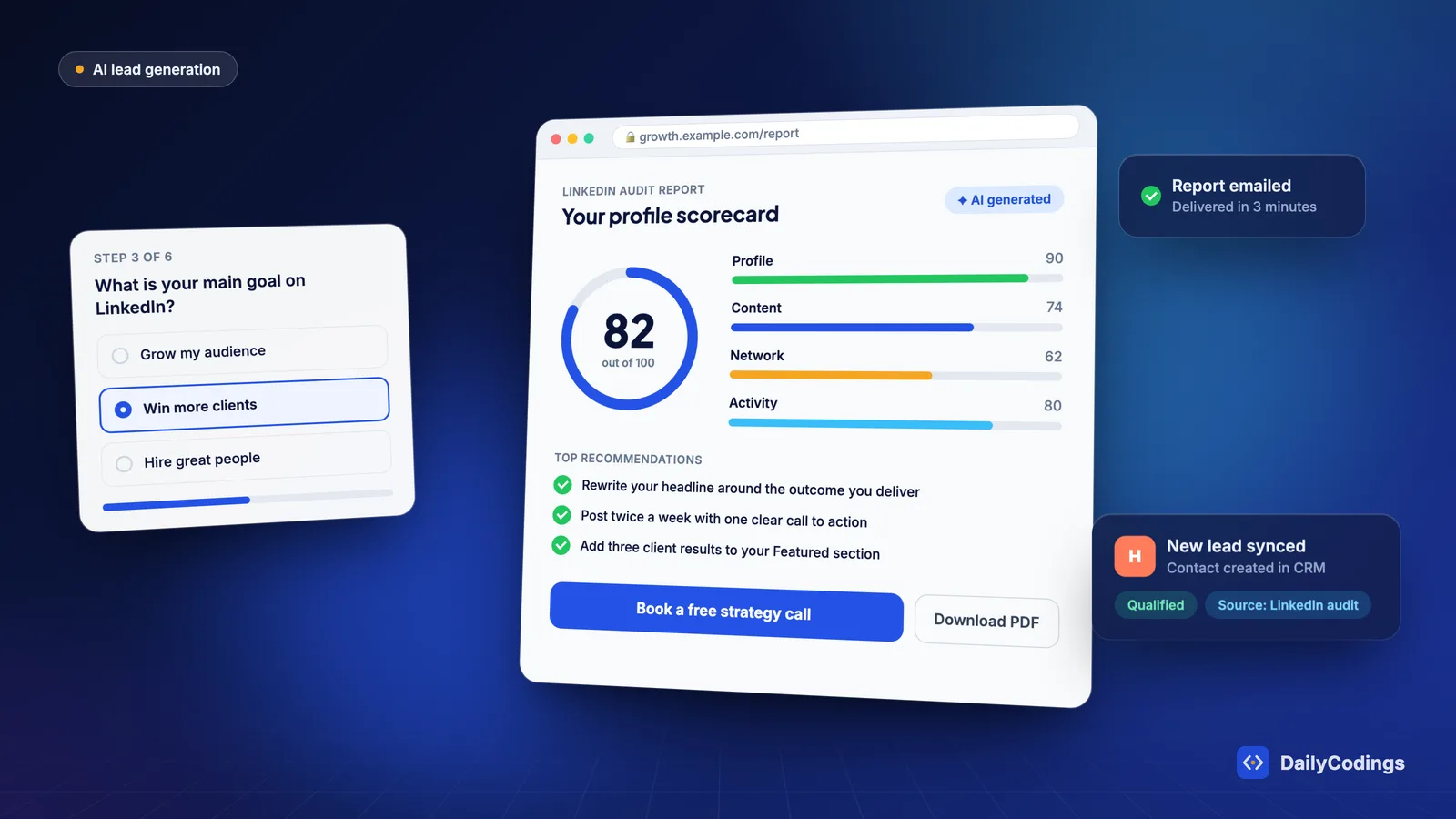
Instead of a form, the visitor goes through a short quiz about their goals, their audience, and how they use LinkedIn today. At the end they share their LinkedIn profile and contact details, and a few minutes later they receive a branded audit written specifically for them.
The quiz does two jobs at once:
- For the visitor, it frames the audit around what they actually care about, so the report reads as advice rather than a template.
- For the sales team, the answers become context in the CRM, so the first call starts from what the prospect already told us.
How it works behind the scenes
The funnel is a small system of connected parts, each doing one job well.
1. The quiz app
The front end is a Next.js app with a smooth, one-question-at-a-time flow. Open-ended questions support voice input, because many busy executives would rather talk for twenty seconds than type a paragraph on their phone. Spam protection keeps bots out before anything reaches the backend.
2. Enrichment
When a submission arrives, the workflow we built in n8n stores it in PostgreSQL and then enriches it. It collects the person's public LinkedIn profile and their company details, so the report can reference their real headline, positioning, and activity rather than guessing.
3. The AI report engine
This is the heart of the funnel. The enriched profile and the quiz answers go to an AI model with prompts tuned to the client's brand guidelines. The result is a structured, personalized audit with clear result metrics, specific observations, and practical recommendations.
Most of the effort here went into the prompts, not the code. A good audit has to sound like the brand, stay specific to the person, and never invent facts about them. We iterated on the prompts until the reports were consistent enough to send without anyone checking each one.
4. Delivery and CRM sync
Once the report is ready, the visitor gets a results email and a results page they can return to later. At the same time, HubSpot receives a new or updated contact with the audit results written into contact properties, and the lead is routed to the sales team. Follow-up emails continue the conversation automatically.
Lead quality: count only what is real
A funnel is only as good as the leads it produces. Once paid campaigns were pointed at it, every fake email or duplicate conversion would cost money and confuse the ad platforms. So we added a layer of checks before a lead counts.
- Live email checks catch undeliverable addresses and suggest fixes for common typos, such as a misspelled email domain.
- Phone validation by country keeps submissions within the markets the team actually serves.
- Conversion events fire only after the backend accepts a lead. Early on, conversions fired in the browser the moment someone clicked submit, which counted failed and duplicate submissions too. Moving the event to after the server confirmed the lead removed these "ghost" conversions.
- Attribution travels with the lead. UTM parameters and ad click IDs are stored in a shared tracking cookie and passed through to the CRM, so the team can see which campaign produced which customer.
If you take one lesson from this post, take this one: validate before you count. Clean conversion data makes every campaign decision downstream easier.
Reliability: the part nobody sees
An automated funnel fails quietly. The visitor waits for a report that never arrives, and nobody notices until a salesperson wonders why the leads dried up. So reliability was treated as a feature from the start.
- Automatic deployments with separate production and staging branches, so changes are tested before real visitors see them.
- Slack alerts that name the exact failing step, so the team knows immediately whether enrichment, the AI step, or the CRM sync broke.
- Retries on unreliable steps, because external services time out and the right response is usually to try again.
- Runbooks and root-cause reports for every incident.
When outages did happen, the goal was simple: no lead left behind. Every affected lead was recovered and still received their report. That promise matters more to a prospect than any feature on the page.
What we learned
Lead with value. People are far more willing to share their details when they get something specific and useful in return. A personalized audit earns trust before the first call.
Prompts are product work. The quality of an AI feature lives in its prompts, its inputs, and its guardrails. Tuning them to the brand took more time than wiring up the model, and it was worth it.
Measure only real outcomes. Validation and server-side conversion tracking turned noisy numbers into data the team could act on.
Plan for failure. Alerts, retries, and recovery steps are what let a small team run an automated system with confidence.
Could this work for your business?
The same pattern works well beyond LinkedIn audits. Any business that can give a useful, personalized answer from a few questions and some public data can build a funnel like this: a website review, a pricing estimate, a readiness assessment, or a tailored recommendation.
You can read the full case study for this project, or get in touch if you would like to build something similar for your own growth.
Frequently asked questions
What is an AI lead funnel?
It is a lead capture flow where AI creates something personal for each visitor, such as an audit or recommendation, in exchange for their details. It gives visitors real value and gives sales teams richer context than a simple form.
Which tools power an AI LinkedIn audit funnel?
This funnel uses a Next.js quiz app, n8n workflows for enrichment and orchestration, PostgreSQL for storage, an AI model for the report, and HubSpot for contacts and follow-up.
How do you stop fake or duplicate leads in a funnel?
Use spam protection on the form, validate email addresses, de-duplicate submissions, and only send a conversion to ad platforms once a lead passes those checks.
Written by
Forhad, Lead engineer at DailyCodings
Forhad builds the systems behind DailyCodings' client work: web scraping pipelines, ETL and data platforms, workflow automations, dashboards, and AI-assisted tools, mostly in Python.
- Python development
- Data engineering
- Web scraping
- Automation
- AI workflows
- Dashboards