- Automation
- n8n
- Zapier
- Make
- Workflow
n8n vs Zapier vs Make: Which Automation Tool Should You Choose?
A practical comparison of n8n, Zapier, and Make for business automation: how they differ on ease of use, pricing model, flexibility, AI, and data control, and how to pick the right one.
By Forhad6 min read
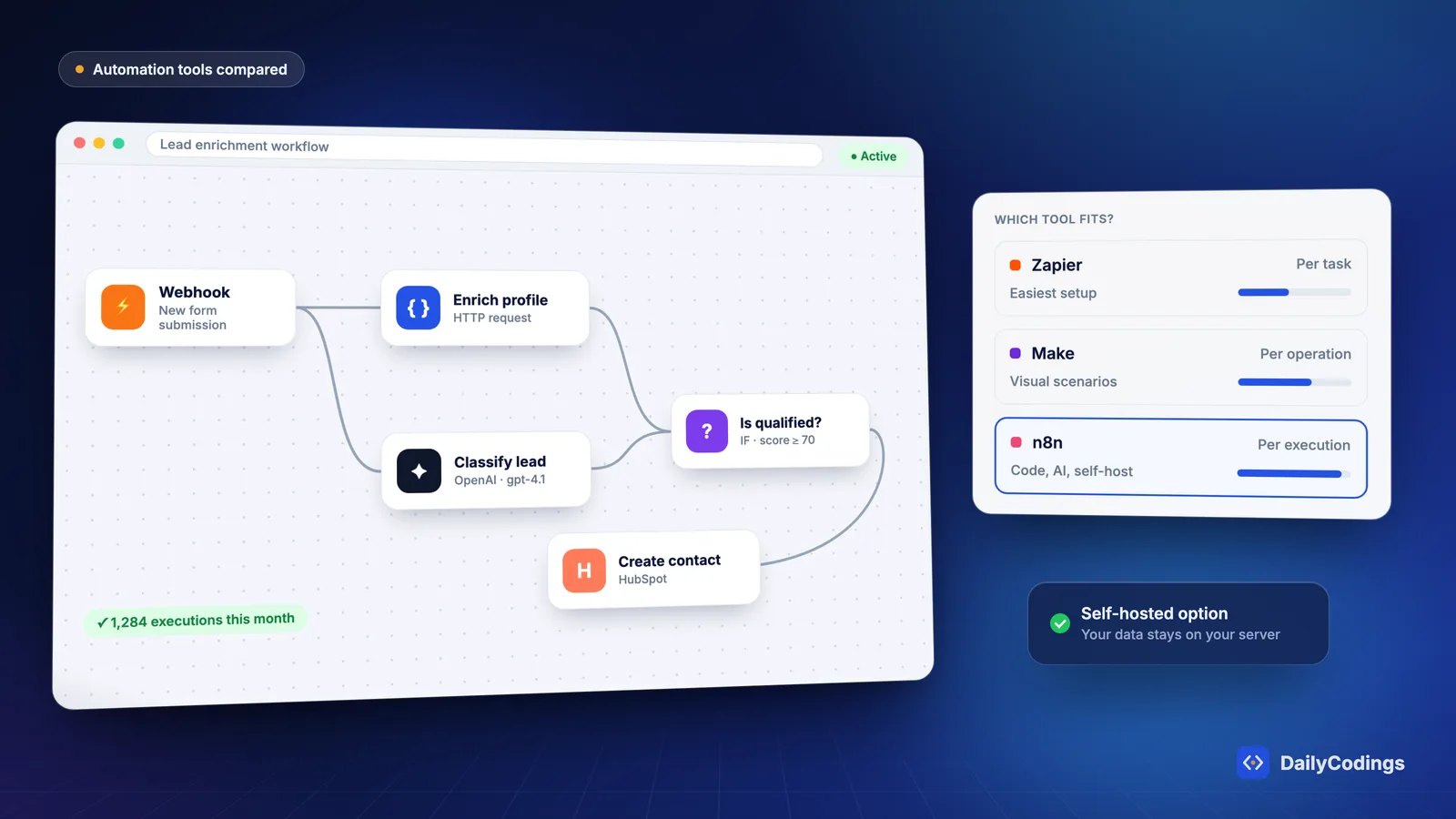
If you want to stop copying data between tools by hand, you will quickly meet the three most popular workflow automation platforms: Zapier, Make, and n8n. All three connect your apps and run tasks for you. They are built for different people, though, and picking the wrong one can mean paying too much or hitting a wall six months in.
We build automations on these platforms for clients every week. This guide explains how they differ in plain terms and gives a simple way to choose.
The short answer
- Choose Zapier if you want the quickest setup, your team is non-technical, and your workflows are simple: "when this happens, do that."
- Choose Make if your workflows have several steps, branches, and data transformations, and you want a visual builder at a lower cost per run.
- Choose n8n if you need custom code, AI agents, large volumes, or full control over where your data lives, including running it on your own server.
The rest of this article explains why.
Side-by-side comparison
| Zapier | Make | n8n | |
|---|---|---|---|
| Best for | Simple app-to-app tasks | Visual multi-step workflows | Complex, technical, and AI workflows |
| Learning curve | Easiest | Moderate | Moderate to steep |
| App integrations | Largest library | Large library | Smaller library, plus any API |
| Pricing model | Per task (each step that runs) | Per operation or usage credit | Per workflow run on its cloud plan |
| Custom code | Limited | Limited | JavaScript and Python built in |
| Self-hosting | No | No | Yes |
| AI workflows | Supported | Supported | Strongest support for AI agents |
Plans and limits change often, so always check each vendor's current pricing page before you commit.
Zapier: the easiest place to start
Zapier is the best-known automation tool, and for good reason. Its library of ready-made integrations is the largest of the three, so the app you use is almost certainly supported. Setting up a "Zap" feels like filling in a form: pick a trigger, pick an action, map a few fields, and you are live.
Where it shines:
- Non-technical teams can build and maintain automations themselves
- Very fast to set up for common tools like Gmail, Slack, HubSpot, and Google Sheets
- Polished interface and reliable hosting
Where it struggles:
- Pricing is based on tasks, and every action step that runs counts. A workflow with five steps that runs a thousand times uses five thousand tasks, so costs climb quickly as volume grows.
- Complex logic, loops, and heavy data transformation are possible but awkward.
- Your data always passes through Zapier's cloud.
Make: more power in a visual builder
Make, formerly known as Integromat, uses a visual canvas where each step is a bubble connected to the next. You can see the whole workflow at once, including branches, filters, and error paths.
Where it shines:
- Handles multi-step workflows with branching and data mapping more naturally than Zapier
- Usually cheaper than Zapier for the same volume of work
- Strong tools for transforming data, such as splitting lists and aggregating results
Where it struggles:
- The canvas takes longer to learn, and large scenarios can become hard to read
- Usage is still billed per operation, so high-volume workflows need watching
- Like Zapier, it is cloud-only
n8n: the developer-friendly option
n8n is a workflow automation tool with a visual editor and a big difference: you can run it on your own server, and you can drop into JavaScript or Python whenever the built-in nodes are not enough. On its cloud plans, pricing is based on whole workflow runs rather than on each individual step, which makes complex workflows much cheaper to operate.
Where it shines:
- Custom code nodes for anything the standard integrations cannot do
- Self-hosting, so sensitive data never leaves infrastructure you control
- Excellent support for AI workflows, including agents, memory, and connections to language models
- Calls any API directly through its HTTP node, even when there is no ready-made integration
- Cost-effective at high volume
Where it struggles:
- Expects more technical skill, especially for self-hosting, updates, and backups
- Fewer ready-made integrations than Zapier
- Self-hosted setups need someone responsible for monitoring and maintenance
We used n8n as the backend of an AI-powered LinkedIn audit funnel. It handles data enrichment, AI report generation, and CRM sync for every lead. That mix of API calls, AI steps, retries, and alerting is exactly where n8n is at its best.
How to choose: five questions
1. Who will build and maintain the automations? If it is a marketer or operations lead with no coding background, start with Zapier. If you have a developer or an automation partner, Make or n8n open up more options.
2. How complex are your workflows? Count the steps and branches. One trigger and one or two actions fits Zapier well. Many steps, conditions, and loops point to Make or n8n.
3. How much volume do you expect? Estimate how many times each workflow runs per month and multiply by its steps. Per-step pricing that looks cheap at the start can become a large monthly bill. At scale, n8n's per-run model or a self-hosted setup is often the most economical.
4. Where must your data live? If you handle health, financial, or client data with strict requirements, self-hosted n8n lets you keep everything on your own infrastructure.
5. Do you need AI? All three can call AI models. If you plan to build AI agents that use tools, remember context, and make decisions across several steps, n8n currently offers the most flexibility.
A common path: start simple, then grow
Many businesses start on Zapier because it is easy, then move important workflows to Make or n8n as volume and complexity grow. That is a perfectly sensible path. The key is to notice the signs early:
- Your monthly automation bill is growing faster than your business
- You are building workarounds because the tool cannot express your logic
- Failures happen silently and nobody knows until a customer complains
Whichever tool you choose, build in error alerts, retries for unreliable steps, and a clear owner for each workflow. A well-monitored simple automation beats a clever one that breaks without anyone noticing.
Need help deciding?
We design and build automations on all three platforms, and we can also build custom API integrations when no tool fits. Learn more about our n8n automation services, or tell us about your workflow and we will recommend the right tool for it.
Frequently asked questions
Is n8n better than Zapier?
Not for everyone. Zapier is easier and faster to set up for simple workflows and non-technical teams. n8n is better when you need custom code, AI agents, high volumes, or self-hosting, because it is more flexible and can cost far less at scale.
Is n8n free?
The self-hosted Community Edition of n8n is free to use under its fair-code license; you only pay for the server it runs on. n8n Cloud and the enterprise features are paid plans.
Which automation tool is cheapest at high volume?
Usually self-hosted n8n, because it has no per-task or per-operation pricing. Zapier and Make charge by tasks or operations, so costs rise as your workflows run more often.
Can I move my Zapier workflows to n8n or Make?
Yes. There is no one-click import, so each workflow is rebuilt, but that is a good moment to add error handling. Running the old and new versions side by side for a short time confirms the results match before switching over.
Written by
Forhad, Lead engineer at DailyCodings
Forhad builds the systems behind DailyCodings' client work: web scraping pipelines, ETL and data platforms, workflow automations, dashboards, and AI-assisted tools, mostly in Python.
- Python development
- Data engineering
- Web scraping
- Automation
- AI workflows
- Dashboards